Qinlani: A Bold Handwritten Font for Elegant Web Design
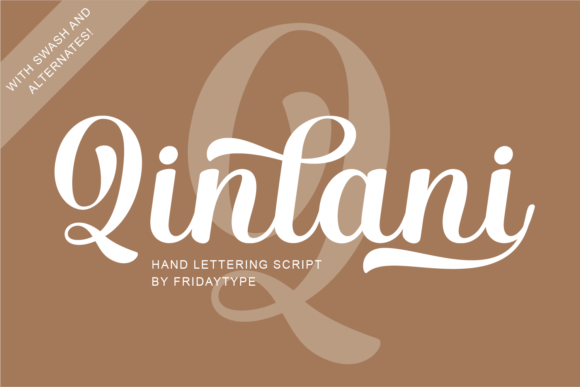
I recently started working on a redesign for a boutique coaching website, and one of the first things I wanted to test was the font choice. The client wanted a warm, inviting, and slightly whimsical feel—something that felt personal but still professional. I remembered seeing Qinlani, a script handwritten font, and decided to drop it into the hero section to see how it would perform in a real layout.
Qinlani in the Hero Section of a Coaching Website
The first test was simple: I placed Qinlani as the headline over a soft, blurred background image of a sunrise. Right away, the font stood out—not just visually, but emotionally. It gave the page a sense of movement and warmth, like the words were painted by hand. Because it's a bold and elegant script font, it worked well as a large header without feeling too delicate or hard to read.
On desktop, the font flowed beautifully, especially in phrases like “Your Journey Starts Here” and “Live with Purpose.” I was curious how it would scale down for mobile, so I checked the responsive preview. The brushstroke texture held up well, and even at smaller sizes, the letters remained legible. This is important when using a handwritten font—some lose clarity on smaller screens, but Qinlani maintained its charm without sacrificing readability.
Using Qinlani for Call-to-Action Buttons and Section Headers
Next, I tried using Qinlani in a few different roles. I swapped out the standard sans-serif buttons with Qinlani to see if it could work as a more expressive CTA. While it looked great on larger buttons, I noticed it started to feel crowded on smaller mobile buttons, especially with longer text. I decided to keep it for short, impactful phrases like “Get Started” or “Learn More” and used a clean sans-serif for longer button copy.
For section headers—like “About Me” or “Program Features”—Qinlani added a lovely contrast against the more neutral body text. I paired it with a light-weight sans-serif font to maintain visual hierarchy. The script handwritten style gave each section a unique personality, making the content feel more human and less templated.
Qinlani for a Product Landing Page or Course Sales Page
Another project I tested Qinlani on was a course sales page for a digital branding workshop. The goal was to create a landing page that felt both professional and inspiring. I used the font for the main headline and a few key subheadings, such as “What You’ll Learn” and “Meet Your Instructor.”
Because Qinlani is a bold and elegant handwritten font, it helped create a sense of authenticity and approachability. It’s not overly ornate like some script fonts, which made it perfect for modern audiences who still appreciate a personal touch. I made sure to use it sparingly—mostly in areas where I wanted to draw attention or add emotional weight.
Pairing Qinlani with Supporting Fonts
When working with a display font like Qinlani, font pairing is essential. I chose a clean, open sans-serif for the body text to ensure readability and contrast. The combination gave the page a balanced look: the handwritten font brought warmth and personality, while the sans-serif grounded the design and made the content easy to scan.
If you're using Qinlani for a blog header or digital brand kit, consider pairing it with a serif font for a more editorial feel. The mix of brushstroke texture and classic typography can create a strong visual identity that feels both modern and timeless.
Testing Qinlani on Dark and Light Backgrounds
I also tested the font over both light and dark backgrounds to see how it performed in different contexts. On a white background, the black brushstrokes looked crisp and clean. On a dark background, I used a light version of the font, and it held up well, especially in larger sizes. Just keep in mind that some of the finer brushstroke details might get lost on small, dark buttons, so it’s best to reserve Qinlani for areas where it can shine without being cramped.
What to Check Before Using Qinlani on a Website
Before committing to using Qinlani in a live site, I always check a few key things:
- Webfont availability: Make sure the font is available through a service like Google Fonts, Adobe Fonts, or as a downloadable webfont kit.
- File formats: Look for support for WOFF, WOFF2, and OTF formats to ensure compatibility across browsers.
- Font weights: See if there are multiple weights or styles included. Qinlani is a single-weight font, so I used it only for display purposes and paired it with a family of sans-serif fonts for body copy.
- Licensing: Always double-check the font’s license, especially for commercial use. If you’re building a client site or using it in a digital product, make sure you have the right permissions.
- Language support: If the site will be multilingual, check for character sets and glyph coverage to avoid missing letters or symbols.
When to Use Qinlani in Web Design
Qinlani works best in scenarios where you want to inject personality and warmth into a design. It’s ideal for:
- Hero headlines on personal websites or portfolios
- Call-to-action buttons with short, impactful text
- Blog headers and digital magazine titles
- Logo text for creative brands or wedding-related businesses
- Product landing pages for lifestyle or wellness brands
- Online banners for boutique shops or artisan brands
It’s not the best choice for long paragraphs or small interface text, but as a display font, it adds just the right amount of flair without overwhelming the layout.
Final Thoughts: A Joyful and Romantic Font for Modern Web Design
After testing Qinlani across multiple web projects—from a coaching site to a course landing page—I can confidently say it's a versatile and expressive script handwritten font that brings a joyful and romantic touch to digital design.
If you're a web designer, UI creator, or brand strategist looking for a font that balances elegance with usability, Qinlani is worth trying. Whether you're building a portfolio homepage, a boutique online store, or a digital brand kit, this bold and elegant handwritten font can help you create a more polished and emotionally engaging user experience.